Saturday, August 20, 2011

My Selection of 20 Live CD/DVD-Subjective

My Selections of 20 Live CD/DVDs with a short subjective comment appear below.

1. Puppy Linux form lupu, to quirky to wary or you can build your own Puppy from Woof: the "Puppy builder".

It can boot from any media from CD, USB, Smart Card. When I go abroad I carry only a Mini CD and USB  version to test any of the hardware i may consider buying from a bargain counter.
It has not build a Cloud Version. Hope they will do that.

I believe in "Small is Beautiful" and Powerful and this is the only distribution that fits that definition and carry all the useful utilities

2. Knoppix CD/DVD, Kids and Games.
This is the one which started it all until Puppy came into the scene. This was my favorite and Damn Small Linux was the utility I carried in my front shirt pocket.
Knoppix has its own virtues.
It never fails you and can be installed into the hard disk now.
It's ADRAIN version support visually handicapped.

3. Debian is the the gold standard for Light Weight and Heavy Weight championship. It is bit quirky for newbies to come first in the list. It has over 30,000 packages to cover all your basic and advanced needs.
It now has Sinhala Capability too.

4.Ping Eee surprisingly comes 4th, simply because it supports laptops and netbooks and it is almost ready for tablet invasion and getting used to what is on the horizon.

5. Vinux comes 5th since it supports visually handicapped and the latest version (3.2.1) can be carried in a USB.

6. PCLinux comes 6th with its FullMonty as my usual workhorse but it has dropped down on my list. It has many versions and 64 bit version  promised has not yet hit the market. To begin with it was only in English and now it is penetrating the Globe.

7. Simply Mepis is the 7th in my honour's list stable KDE with a cleaning utility called sweeper and AntiX for older computers. Taylor Swift which has taken roots from AntiX is still not yet mature enough to be recommended as a general purpose distribution.

8. Ubuntu's unity comes 8th for its innovative approach and getting ready for tablet invasion in spite of many criticism form its user base. 
Its Ubuntu One cloud service of free 5 GiB and music service for under 4 dollars will rock the market in no time.  

CloudUSB its 10.10 derivative is also in my list for getting ready for cloud but it is not a thin client but a very FAT client.

9.  Arch Linux LinuxGamrs Live takes the 9th spot for promoting games. It is something one should always have in your armory.

10. Poseidon Linux not Scientific Linux takes the 10th spot by a wide margin for packaging productive utilities and scientific (including statistics) for business and schools.

The next 10 should not be very unhappy.
11. Sabayon tops the list here for working on the dream we believe in and making Gentoo base working for you. The DVDs I downloaded from Gentoo does not work on my IBM laptop or desktops for me to volunteer any endorsement.

12. Linux Mint

13. Suse

14. Mandriva / Mageia

15. Arch

16. Fedora

17. Bodhi

18. Ultimate / Lubuntu Linux

19. Peppermint

20. PureOS

This list is, guys and girls who are developers working on other distributions is a grave injustice. 
Mind you this is subjective and I will assess all of them in an objective way by giving them points.
Then this subjective element will be eliminated but it takes time.
I have to download and test them alone.
That is why I promote Linux 100 here and elsewhere. 
I will be writing about you too, with points awarded in my own scheme and try to be fair (when I find time) as much as possible.

Poseidon Linux for Scientific Packages

I said I was running out of ideas for Linux newbies, a little premature and within 24 hours I have to post this on Poseidon Linux.
I also said that I may concentrate on academic activities.
This is about Poseidon Linux latest version and about scientific packages including statistics and gplot.
This is Ubuntu based distribution ans has all the scientific packages one may use in K12 level.
It has Scribus, Blender, Inkscape and Open Office and it will be handy on a school setup.
Few thinks it lacks is Skype, gparted and games which can easily be downloaded if one needs them.
This will fit in nicely in a school environment.
Only problem with it is, it does not have a torrent file and my download from point to point broke down twice and the third time I was lucky and it took over one day(night) of downloading.

I hope the guys and girls in Poseidon will sort that out soon.

Friday, August 19, 2011

I am running out of ideas on Linux

This is the penultimate stage of my blog activity and I would now concentrate on marketing aspect and perhaps academic aspect later.

I must write few lines about OSDisc.com.

It does some things which I would have liked to do myself in the Third World and in my country.

It sells live disc and live USBs of all the Linux distributions.
You do not have to do what I do.
Download and test and write something here.
You go to that web site and order what you want after having read some of my comments.
All the items are low priced.
One only needs a credit card.
It also does something very good part of the sale is contributed to Open Software development.
So every time you buy something you are indirectly contributing to the developers.
Mind you in this credit crunch and debt crisis which is global we must not stop innovation things.
Credit crisis should open for new innovation and not for grumbling.
This is where Linux is way ahead of the pack.
Web site is very simple and nicely organized and has ranking of sales which is good thing before purchasing.
It has book section also and if you wont one investment for all go and my choice is given below.
Mind you I have several copies of this book.
I have paste the product description below.
Product Description
The most up-to-date guide on the latest version of Linux Linux is an excellent, low-cost alternative to more expensive operating systems and its popularity continues to remain on the rise. This comprehensive resource offers more than 100 pages of the most sought-after Linux commands, provides new tutorial chapters aimed specifically at Windows desktop users and Windows administrators, and includes a new chapter on using Linux on gadgets. You'll get up to speed with Linux so that you can install secure, fully functioning Linux server systems.
  • Shows you what Linux is capable of, how to install it, how to make the most of its features, and ways to make use of its commands
  • Provides step-by-step instructions for transitioning to Linux and explains how to choose which distribution is right for you, find and use the applications you need, set up the desktop to be the way you like it, and more
  • Walks you through transferring your stuff (music, documents, and images) from Windows to Linux
Whether you're making the transition from Windows or Macintosh and need to choose which distribution is right for you or you are already savvy with Linux and need a thoroughly up-to-date guide on its newest features, Linux Bible 2011 Edition is a must have!
Try out 18 different Linux distributions to see which is right for you
Inside many stock exchanges, mobile phones, and Internet servers is an operating system that many people haven't even heard of—it's called Linux. Today, you can run this open-source software on your personal desktop, on an Internet server, or as a programming workstation. In this complete guide from Linux expert Christopher Negus are all the instructions and software you need to install, set up, and use Linux.

  • Install, set up, and use the latest Linux systems for desktops and servers
  • Configure the perfect Linux desktop system for you
  • Launch all your music, video, images, and documents in Linux
  • Set up your own print, file, e-mail, and Web servers
  • Get a stable and secure system using Linux security tools
  • Create your own cool apps with useful programming tools
A total of 18 different Linux distributions are included on the DVD!

  • To try out Linux, boot directly Ubuntu, openSUSE, KNOPPIX, Fedora, PCLinuxOS, Gentoo, BackTrack, and other live Linux distributions
  • To keep Linux permanently, install those and other distributions to your hard disk
What's on the DVD?

  • Ubuntu Linux (live/install)
  • Fedora Linux (install)
  • openSUSE (live/install)
  • KNOPPIX (live/install)
  • Gentoo Linux (live/install)
  • Slackware® Linux (install)
  • PCLinuxOS (live/install)
  • BackTrack (live)
  • AntiX (live/install)
  • INSERT (live)
  • Puppy Linux (live/install)
  • Debian GNU/Linux (live/install)
  • Damn Small Linux (live/install)
  • SLAX (live)
  • System Rescue CD (live)
  • Coyote Linux (floppy firewall)
  • TinyCore (live)
  • CentOS Linux (live/install)
System Requirements:

  • All software built for x86 computers
  • See chapters on each distribution for system requirements
Turn your PC into a Linux desktop system
Learn to use Linux as a system administrator
Find and install loads of free software apps

Wednesday, August 17, 2011

CloudUSB and Cloud Support

Now I can report that CloudSUB gets exactly 1240 points what Ubuntu LTS got. 
In my scheme nobody gets 100 (I believe we have to approach the target of 80%) since when one delete a feature, in this case the distribution cannot be installed into hard disk and it misses on some points and it get more points for adding cloud support which Ubuntu has from its version 9.
This is where I defer from developers that base their activities on previously developed and established distribution which sometimes limit  or cramp up innovation by design.

Reason for suggesting start from the scratch below is based on that observation and premise!

Below is a user comment about CloudUSB distribution and I use the comment below of this particular user as base to give some of my views.

Mind you I have not tried it myself except booting the Live DVD.
I tried the UnetBootIn but could not open the Download Folder  in PCLinux in my hard disk where the CloudUSB image was downloaded. The distribution in my hard disk was PCLinux and it may have been different if I had Ubuntu in the hard disk. 
There was conflict of download folders of Ubuntu and PCLinux.
I have unity in my laptop and would try this again when I have time and report to you later.
However, read my writing on UnetBootin elsewhere in this blog site for further details.

"CloudUSB is a USB-based Linux distribution based on Ubuntu 10.04 LTS. 
The idea is that you can carry your own Linux distribution with you for use anywhere, thus allowing anyone to use Linux on any computer and keep their data safe in the event the USB key is lost. 

In practice, this is more limited than suggested by the Web site.

To use CloudUSB, you need to download a 950MB ISO image and a script to copy the image to your USB key. 

The script makes use of UNetbootin to copy the image to the USB key and set it up correctly. 

It takes about 10 minutes to copy CloudUSB over and get it ready. You'll need at least a 4GB key to use it effectively, and larger is better if you have a significant amount of data. I (not me) used an 8GB Seagate "puck" USB drive. The configuration routine allows you to decide how much room to allocate for data, so I split it evenly between 4GB for the OS and 4GB for personal data".

My comments about CloudUSB.
1. This idea of integrating with cloud service is excellent but implementation has some glitches.
2. It is not a service but it is a cloud client (same terminology as in Torrent downloads and there are many clients for Torrents but Torrent is the best Linux service available for third world).
3. It is tied to Ubuntu and it can very well use the Ubuntu One Service which is 5GIB. Mind you simply because of this I have switched off my lack of allegiance to Ubunutu and I now have Unity in my laptop and not Ubuntu 10.10 L.T.S.
I use a USB hard disk and not a USB stick and my favorite is now Ping Eee.
Thin SATA laptop hard disk can sit in your front pocket and one can buy one for three GiB Flash Drives' price.

4. Next point is relevant because of Ubuntu switching to Unity desktop, the CloudUSB will have some teething problems.

5. My biggest critical comment is that it is not a thin client but a very very fat client. It needs to shed its dead weight of Ubuntu  and "start from the scratch and be distribution independent".

6.Its integration with Dropbox is scratchy and Dropbox gives only 2GiB free and its policy re-evaluation has caused some bad taste in the mouth.

7. It should take a cue from Peppermint (it is supporting Google plugins) as far as the general users are concerned but must give a serious thought to the developers and Linux administrators (they will love to carry it in the pocket when on service duty away from home, may be in a foreign country).

8. Adding UnetBootin, WireShars, Emac and Skype (? now Microsoft's) are good money but adding more dead weight to already chunky Linux chocolates.
Cloud is going to rule and we have to re-engineer everything and sometime from scratch.

My vision.
1. Make it very very thin client. It should be for Administrators and Developers  level at this level. In the line of Puppy Linux and under 200 MiB. I am surprised Puppy does not have a cloud client.
Do they?
It should have gparted  copy image and the like. When it is is light the problems that you have encountered with Ubuntu LTS won't arise. Go for Dilo or SeaMonkey instead of Firefox which is getting bloated and unmanageable.

2. Then a Middle Weight client in the range of 500 for users.
this is the Peppermint style!

3. Then the Business Class with a full blown heavy weight distribution and Dropbox, Skype, Web Editor, Emac, Wireshark and all security and encrypting utilities added.
I suppose with Ubuntu going in many direction base ought to be Debian.
I suppose one should start with redobackup by Debain.
It may be a good base to begin with and in notime it will be bloated to Business Class with developers helping.
Mind you one does not have to abandon CloudSUB but add the ones I have mentioned to the repertoire as additional CDs/DVDs.
I am in the process of realigning myself to think what is the minimum I should carry in  a CD or Flash Drive (may be even to my grave and the coffin may not be that heavy to carry then with all the unnecessary paraphernalia she in advance).

Come up boys and girls do some exercise to she weight around the belly or belly button.

Tuesday, August 16, 2011

Linux Games I Love to Play

Linux Gamers Live, the Arch derivative is top of my list and Linux Ultimate Edition is close second and Knoppix 2008 December edition comes third and i could not find a new version of games in spite of Knoppix 6.7 was out and looks fantastic.Knoppix cannot be installed on hard drive.
Why I choose Linux Gamers Live was simply because its front end just looks like Apple front end and ready for games with icons instead of names.
It also can be installed into hard disk now.
Now instead of trying to outscore these three edition which have done a lot for Linus games, I will list my favorites below.
 
Even PCLinuxFuillMonty thought they have place for Linux guys and girls. 
Indirectly FullMonty comes fourth.
 
1. Number one is Super Tux 2 and I enjoyed playing hours and hours.
2. Close second is Pingus and its environmental theme is commendable.
3. Number three is Extreme Tux Racer which is sweet and relaxing
4. Number 4 is SuperTuxCart (this is for the racing addict)
5. Number 5 is Tuxcart (This is for the training on racing)
6. Number 6 is Frozen bubble
7. Number 7 is any of the 100 of tiny games
If any of the Linux distributions fail to introduce any of the top 5 of mine selection i thought of giving them minus marks in my rating in future.
Mind you with Wine and getedit one can play windows , DOSand Atari games of the yesteryear.

Monday, August 15, 2011

Linux for Kids

Linux for Kids

Now that I have talked about Linux games it is imperative I should write something on Linux that parents can use with their supervision (this is important since some distribution might go straight to the wider web with one or two clicks).
There are many and I will dispense with the distribution first before talking about the software packages.


1.YouKnowforkids

2.Knoppix for kids

3.QIMO

4. DoudouLinux

5.Foresight for Kids (Latest finding that I am going to download soon)

Out of the packages GCompris comes first and SUGAR (OLPS Project) second.

I like Tux paint and Tux Typing the best though.


Some distributions incorporate these packages in the iso image but if it is not their one should not worry.
One can download from the software repository.
Latest Unity Ubuntu did not have SUGAR and in five to ten (5-10) minutes especially in the night one can download and install them.

Sunday, August 14, 2011

What determines the Flight Paths of Birds?

The long drawn out trade Union Action gave me some free time to watch bird migration.
This year the weather pattern was bizarre and in keeping with that the birds that came in also differed in type if not numbers.
Numbers never approached the 30 which I used to count 30 years.
Numbers have come down to 3 to 5 and only fluctuation was seen in the migratory birds.
Unsusal finding was there were three types of woodpeckers.
The common one without a distinct crown feather with a big beak.
Another tiny woodpecker (not young ones) and the third was exotic hooded varity very beautiful.
All of them were looking for nesting site and were exploring the bread fruit tree for boring holes.
They came for about three days and vanished.
I am fortunate but (birds are not and their flypath is now interrupted by rapid development and there is no food or water. surface well that the birds came was closed in the name of development and the little stream is dry now.

What determines the Flight Paths of Birds?

We can assume they migrate  in search of food, nesting site and to avoid the harsh winter condition but what determines the flypath?

I wondered and wondered.
We have not done adequate studies to postulate any firm scientific theory.
I developed a theory based on simple observation.
All the birds hate rainclouds.
Not only clouds interfere with vision but the cold weather fronts and lightening must surely be frightening to the birds.
My observation is relate to the movement of clouds.
The clouds h the Hanthana range and breaks into basically two paths.
One goes towards Kandy and the other towards Katugastota.
Usually one dominate the other.
If the clouds come down towards Panideniya it is very likely the clouds will go towards Katugastota.
If it does not but hit the Peradeniya Botanical Gardens it will move definitely towards Kandy.
All these are very simple observation and nothing extravagant and I see them and avoid the rain especially when I do not carry a an umbrella.

There is a corridor of no clouds and the birds often get it right and come well in advance of the rain in this corridor.
No rain or thin drizzle the birds are their in numbers.
Heavy rain of course no birds and the local resident birds get out of the way well in advance.

This of course is a very simple observation but I really do not know why these birds take a particular patway.
This is something I will study if I find time or in my retirement. 

One thing is sure if we make radical change to the tree cover in the name of development the birds I see now will be never seen again on the same route.

Saturday, August 13, 2011

Linux Gamers and IgLive/Knoppix

Knoppix had a Game DVD in December 2008 but quiet since then but the new Knoppix 6.4 and 6.7 with support for visually handicap are fantastic.

Knoppix gamers cannot be installed on hard disk.
This was the same scenario with Linux Gamers Live the Arch derivative.
Their 0.9.7 (CD/DVD) has remedied this and have install and persistent facility.

Beware I won't try the installation on hard disk but only on  a Flash Drive and if I make a mistake for a for b or b for a my hard disk will be erased with  only one warning. Unfortunately its GRUB cannot read my complicated hard disk.
Anyway it is a good try and better than the last version.

Ubuntu based Ultimate Edition is out with Light and Full version and  I have not downloaded it yet (point to point download is damn slow in thus part of the world).

Thanks guys and girls now you have placed an image at Linux Tracker.
(I am waiting and expecting them to place a torrent copy at Linux Tracker).
Thanks guys and girls you are doing a wonderful service and this is the only area Linux is still lagging behind.
I do not mind developers placing the games for purchase and that will make cash available for more ambitious work and developers also should need to survive at a time of debt crisis.

The idea is for you to be able to carry a decent amount of high-quality Linux games with you where ever you go for purposes of demonstration, gaming or parties. 
Your computer will remain completely unchanged as everything will run live.

It can boot this distribution from a CD, DVD or USB flash drive.

Thursday, August 11, 2011

DoKuWiKi and WikiSpaces

It is time for me to expand the horizon of words world and go deeper into the program world where work is done almost on Unicode.
Let me be fair to the Linux Community and illustrating DoKu WiKi in no way undermine there efforts that are for professional programmers.

Vi is my number one.
Gedit is the one I used when editing files in Redhat 8.

Then there are Bluefish, Cream,Quanta and many more which I have forgotten the names.

Please do not confuse this with DidiWiKi of Puppy Linux.

I was abroad when early changes in computing (Commodore, Atari, Sinclair, BBC Basic) were taking place and when windows came I wanted to buy a (last item in my shopping list with little money in my pocket and my wife having a hawk eye view, that I would put my last dollar on a worthless junk machine-very expensive then) a computer and going around the few shops in the high street selling computers (price over 2500 dollars) the salesmen were ever willing to show me the tit bits and sell.
After the demonstrations I asked the guys what program language I can type on this machine they were speechless (this little guy from Asia talking like a programmer) and told them I would not spare my money on a machine which I cannot write at least 100 lines of code for fun and promptly exited saving my money making my wife very happy.
The rest is history till I got into Linux where from Python to Ruby to C to C++ were there but very rarely explored them since my medical duties tax my time to the hilt.
While me doing night duties and you programmers were doing wonderful work with mid night commander and burning mid night oil.
So thank you guys and girls.
I am in no way excluding your efforts but this is to expose the newbies to the real world of computing and using DoKuWiki is only an introduction.

 DoKu WiKi I downloaded was only 2.7 MiB and AbiWord is 7.9 MiB and it does my word processing. It has tahs for Apache, DTHML, html, PHP and SQL.

I  typed one line and saved it in UniCode (Graphic front end and code in the background) and opened it in Abiword and saved the line in abi.
You have two utilities using under 11 MiB which are super fast and minimal Macros, why you go for a Gorilla which you cannot handle when you are a newbie? 
This is why I always say "Small is beautiful and bigger is never the best"

Now few words about Wikispaces.
It gives you 2 MiB of storage free which you can share documents with your class mates and teachers.
I have already opened a space for my students in the university and another for K-12 class, even though I use Google and Wordpress almost exclusively for my blog activity.
Wordpress is of course professional class and the best I have used.
I will cut and paste few of the comments at their site for you to read.


"You guys have great customer and technical support--about the best I've experienced since the Internet began in fact."  


"I am a HUGE fan of Wikispaces for its ease of use and its endless options for collaborative projects and have been encouraging all my teachers to create a wiki for their class." 


"Thanks for making it so simple for my fellow classmates and I to connect. We've got a 20 year reunion coming up, and there's no better, easier, and fun way than through wikispaces. I truly appreciate your efforts!"  


"I had 80 kids register for Wikispaces today in class. Almost all of them said they were going home to make another one for personal use. Great tool, keep making it better." 


"Let me say how impressed I am with your service. It always amazes me that such an organization still has that personal touch." 

Thanks guys and girls for your comments which I have reproduced here.

Wednesday, August 10, 2011

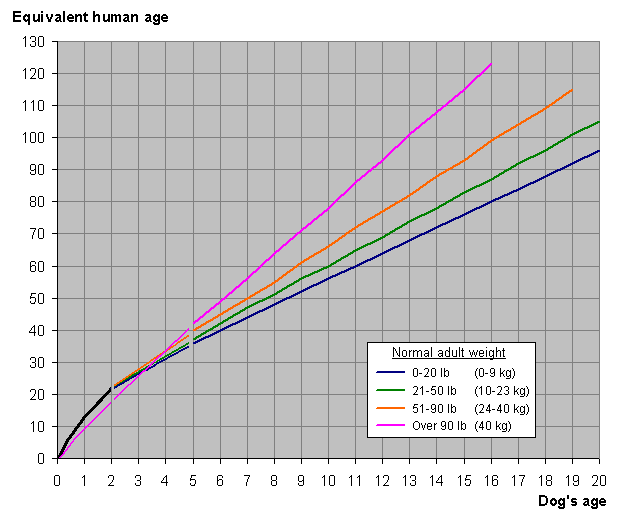
Old Dog Haven and Senior Dogs

There are lot of myths about dogs but here I want to illustrate few human facts that I should communicate with Maha Brahma who was a yesteryear dog exterminated to make room for Perahara Pilgrims that visit this holy city of Kandy.
Most of Sri-Lankan end up in hell whereas the Maha Brahma's dog and present assistant of Maha Brahmas were dogs from this country. By clever design they ended up there and for my luck I happened to know the Present Maha Brahmas Assistant as a Paraya dog in Kandy and I am fortunate enough to communicate with him by virtual email.

First the bad news.

Lot of paraya dogs were cleared up recently in preparation for Perehara and I want a place reserved for them in hell (for the municipality exterminators not the exterminated paraya dogs).

In some countries when they are old they are sent to Old Dogs Haven.

I want the Maha to take them to heaven moment they are exterminated but make a short list of the exterminators and send that list to Apaya (Hell) Server. 

I have designed a full proof program to catch dog killers and that is working nicely in Apaya Server currently but the problem is these dog killers live longer  than the dog by many a mile due to cardiac surgery performed.

Senior Citizens                                                   Senior Dogs

1. They have homes for the elderly          1. Haven is practically hell for the dogs
2. Some senior citizens by that             2. There is only extermination decree age become mayors of the holy city 
3.They never give way to juniors             3.Junior dogs take charge of the brood


I have another plea.

If one wants to age with the dog please do the following.

1. Take care of a young dog at the age of 43 (when nobody seems to want you including your wife and kids) years.

2. When you are 50 your dog is 7 years old and equal to 50 years of human age.


3. In another three (3) when your dog is 10 he is equivalent to 60 human years and you will be 53 years. You are younger by 7 years.

4. In another two years dog (at 12 years) will be 70 and you will be only 55 years.

You are younger by 15 years.

43=0

50=7=50 ( only at 50 one can be at the level of the dog age and enjoy with your contemporary to your heart's content and his company prevents you from getting a heart attack, if you delay the dog will get a heart attack).

53=10=60

55=12=70 (This is the time you get a bypass operation and  the dog gets a heart attack).

5. Now that you have become the mayor at 55 after retiring from service would you be kind to this dog  who is 70 years human equivalent (12 years  of our time) or sent for the Municipality Exterminator.

6. They are just old senior dogs / citizens they do not have a parliament to go but only the streets but unlike you they look after our streets even at night when young, is it reasonable to put them to death?


7. How come if I say all the senior citizens who were ex-parliamentarians and drawing a fat pension and to save money for development they should be exterminated.

Will you pass a bill and vote yes  in parliament?

Are we reasonable human beings?


Below is a Image from WiKiPedia.

I hope WiKipedia won't pass copyright infringement for taking the side of the dogs against humans.

http://upload.wikimedia.org/wikipedia/commons/8/88/Dog_and_human_year_graph.png

Monday, August 8, 2011

Slate and Slate Pencils

Slate and Slate Pencils

Digital devices are good for teachers and I am not sure whether too much of technology will be goo for kids.

Children have to use fine motor and gross motor skills as they grow.
Slate and the slate pencil were the primitive but sure way to learn finer motor skills and specially the hand writing.
In the west they are even banning cursive writing and when the grow up I cannot think of them becoming neurosurgeons (microsurgery need hand skills that are properly developed as children and not as adults) or eye surgeons.
We might have to use rots to do surgery then.
I had my granite slate till I was 25 years old and I gave it to a poor kid and he did not keep it for even three months.
In this consumerist society people do not value conservation and the amount of plastic junk we are collecting we won't be able to clean up for 100 years.
My slate was very special to me.
One side there was horizontal lines and the other side there were squares and I could practice as much as I wanted and my saliva was the best wet cleaner. My hand writing were no very good at least they were legible till I became a practicing physician and they automatically became illegible again. Point I am driving is slate was eco-friendly and there were no papers and no trees chopped down, then.
We are heralding an era of paperless and digital era and the rime is right for slate again if not digital pads.

I am not saying we much go backward what I am stressing is that manual dexterity and fine motor skills were something we developed in evolution and apes do not have these skills.
A monkey cannot open a door holding the knob and as kids we could not do that and we had to learn it and if technology retard our finer motor skills I do not know what will happen to us 100 years from now?
Calibre and DRM (Digital Rights Management)

Testing Linux distribution plunge me into deep waters but very often I find some interesting stuff.
Calibre is an Open Source E-Book Management System I found already installed in Pinguy / Ping Eee.
If you don't have it go to its website (there is a good demo) and download free. I belive it has a Microsoft version too.
It does the following.

1. Manages your E-book library

2. Converts the E-books to the device format for Reading

3. It synchronizes the device with your computer and exchange device to computer and vice versa

4. It is a E-book Viewer

5. Download e-books and news around the world

If you are good reader like me  this cute little program is for you.

Now then what is DRM?

It is Digital Rights Management system by which publishers and device (OEM) developers prevent infringement of copyrights of the digitally available material.

There are four main ebook formats at present.  

Mobipocket,

Topaz,

EPub and PDF.
The Amazon Kindle uses Mobipocket and Topaz and it also supports native PDF format ebooks and native PDF files.
Other ebook readers mostly use ePub format ebooks, but with differing DRM schemes.
Some call it Digital Restrictions Management and whatever the way one interpret it there is a law that prevent copying.
Not only e-books, audio, video and even TV shows are protected.
In time to come even in the developing world we might see tablets and  E-readers instead of slates and slate pencils which I used when I was a kid.

Sunday, August 7, 2011

Linux100-PureOS-Light and Standard


Linux100-PureOS-Light and Standard
Very good light distribution of 366 MiB from Debian base. Guest and Root logging allowed. Only when logged as root one can install the distribution. Mouse based xfce x-windows is light on your RAM and very fast to boot.
Has all the utilities including Aniword.
The standard 700 MiB distribution is very beautiful and has Libre Office and gparted.The standard distribution is Gnome and is even better than xfce with blue hue used by Debian.
It based in France and the Administrator has taken all the trouble to list all the list of packages which may have taken an hour to type.
They are also promoting PureWebOS but I COULD NOT FIND the image to download.
This will be a healthy competition to HPWebOS, unless they decide to release it as OPEN SOURCE.
WordPress is also having a WebOS THAT CAN BE DOWNLOADED to a mobile phone.

Its light weight edition of PUREOS is also not available to download.

Friday, August 5, 2011

Cloud Computing-Ubuntu One

Below is a caption I enclosed for getting a PDF file from a web hosting service in America.

"Assuming that there is no power outage or failure and download speed is instant and fast (both these premises are hard to come by and ensure in the Third World) cloud computing is the next best thing that happened after World Wide Web. 

This can be better utilized in a school setup or in a University (I call it the Virtual University where everybody is a graduate or undergraduate). 

The potential is enormous once the infrastructure is laid down and maintained with a stable cloud".

I have decided to support Ubuntu Unity and Ubuntu One.
I hate the Free Books often outdated (especially in Science and IT) by 30 years dished out by the Education Department and the recently politicized new entrants (inculcation) discipline program (Yes Men and Yes Sir Program).
It is an insult to freedom of thought and exercise of free mind in creative work.
That is another reason for promoting Ubuntu One.
Without duplicating of information Cloud Computing can bring whole world together.

I am believer it can be done cheaper than the Government's Free Text Book Program.
I hope Mark Shuttelworth, the Guru can initiate it in South Africa and take few  of  our teachers from here for training there (instead of the English Instructors we got from India to teach English to teachers of English) and send them back with Ubuntu Unity CD/DVD (No more free CDs from Canonicals now) and IT and English Training.
He does not have to spend South African Money.
All he has to do is to give a free laptops to all opposition MPs with music streaming charged at 10 times the priming price instead of the basic customer price. 
That alone is enough to finance the project and voters get money back guarantee.
The money we pay them as pension after five yeas and pay while they are not doing anything except fighting for the top post-leader of the opposition).

They are not doing anything except singing local Baila (variety of song in this island and also use as substitute for lies -usually used by policemen) instead of actively engage in voter / consumer based politics.

Regards to the MPs in power who are more often abroad without even not knowing how to fill airport form in English should be sent to moon or given a satellite telephone to keep in contact with aliens.
The money for those utilities should come from President Fund to which our Lottery money is diverted.
All of them have become alien to the average voters needs.

But the language of instruction has to be Universal and it cannot be Sinhala or Tamil.

I hope present day parents, teachers and above all students should realize this.
We do not want to be like frog in a deep (Enclosed Island) well.

UnetBootIn-Update-Using Vinux booted Ping Eee on USB

I am posting this with Ping Eee booted from USB.
How I did it.
Steps.

1. Booted Vinux from my laptop (It has Pinguy with UnetBootIn, too).

2. Clicked UnetBootIn

3. Selected Ubuntu for Booting from Menu

4. Attached the Hard Disk mounted on USB enclosure (this was the hard disk I removed the other day when I upgraded my laptop with a 500 GiB SATA).

The partitions were formatted with gParted with Knoppix Live On booted and  the USB enclosure attached.
5. Loaded the DVD with multiple Linux images (copied previously)

6. Give the path for the image (Ping Eee on this occasion) in the DVD.

7. Selected Ping Eee and clicked OK after selecting the partition in hard disk where the live image should be installed, mounted on a tray/bay USB enclosure.

Partition used was not FAT but Ext 4.
8. Waited 10 Minutes for automatic installation of the Live Script.

9. Shut down Vinux and Restart with Internet cable attached.

10.Ping Eee up and running and Firefox activated and my fingers doing the rest.

I will Install Ping Eee if the laptop has a free partition but remember I stated above that I have already installed Pinguy (Not Ping Eee).

This post is to put the record straight and my previous post on UnetBootIn is now no longer valid and redundant.

The UnetBootIn has fixed most of the problems which I had when I booted PClinux on a Pendrive 3 months ago.
Thanks guys and girls who updated UnetBootIn and Vinux and Pinguy/Ping Eee for including UnetBootIn in the distribution.
I will load few more distributions in my USB hard disk for future installations On the move / On the fly.

It is cool and cute way Linux works for me.

Can Apple Mac match this feet?

I don't think so, Kevin in Home Alone, says so!

Wednesday, August 3, 2011

Ubuntu One and Cloud Space

Update on Ubuntu One
I am glad to say Ubuntu One is available in all the Ubuntu derivatives I have installed in my laptop, namely Pinguy and Vinux.
It took a long time for me to find where it is in the Menu List, the Ubuntu One is placed and it is under preferences.
In Pinguy it is in the Graphic Menu List in the bottom panel and moment you log in with Ubuntu One a folder is open in the left side panel. 
I have Dropbox downloaded / installed in Pinguy and that means I have  8 GiB of Cloud Space Free 5 in Ubuntu One and 3 in Dropbox. 
Now I can drop a DVD image of a Linux distribution in Ubuntu One to share with Linux friends.

In Ubuntu Unity one can at the time of installing Ubuntu One, the shared folder can be added to the left side panel which is a very nice Apple like feature. 

Thanks guys and girls of Ubuntu Community for doing wonderful things.


Not only Ubuntu is getting ready for the next phase of computing with Unity desktop it is also ready with cloud space.

Ubuntu has Ubuntu One, it’s built-in cloud file, both Client and Service, since Ubuntu 9.10 which was released in October 2009.
One does not need another cloud service if you are using Ubuntu.
There is also a distribution called CloudOS based on Ubuntu.

For those who prefer more storage, Ubuntu One Basic, the free service, has changed its name to Ubuntu One Free and it now comes with 5GiBs of free storage instead of 2GiBs.

If you opt for the paid Ubuntu One Music Streaming service in addition to music streaming, you’ll get an additional 20GBs of storage. 

For $3.99 a month that’s not bad.
Need more room?
It’s $2.99 a month for each fresh allotment of 20GBs.

On top of that there’s also now Ubuntu One file and music streaming clients for Android.
There’s also an Ubuntu One iPod/iPhone/iPad music streaming client.
Very soon iOS too.

This is what I call hit three birds with one stone.
So do not grumble saying Ubuntu has changed.
Yes it has changed for good with tablets in mind.
I am less and less reluctant to say no to Ubuntu now.
I have already installed Ubuntu 11.04 in my laptop.


Tuesday, August 2, 2011

Linux, Piracy and emergence of Copyright Laws

Below is a reproduction of a comment from distrowatch with some additions relevant to us.

In the freedom-loving developed countries of the West, jack-booted storm troopers from The Intellectual Property Cartel may well break down your door, haul off your computers, and after forensically examining the hard drive, impose harsh fines and criminal penalties if they discover an unlicensed software application or a pirated MP3 file. 

This scenario is fortunately seldom seen in the Third World, where the police, judges and government officials charged with enforcing the law are also running pirated copies of Windows on their home computers too.

(In addition Buddhist monks in temples use pirated copies breaking one of the five precepts and interestingly enough most of these computers are sponsored by the government.
What is even more relevant is even in schools and universities (who should be vocal in protecting copyrights law) use pirated copies).

This attitude of the education department encourage and perpetuate the violation of copyright law. Even entering a National School at year one all the possible  act of violation are  enacted by parents sometimes with inside help and young one are taught to lie and cheat and after 30 years these very same people enter the parliament one cannot expect the legislator to act impartially.
In actual fact they get in there to violate laws (in all the spheres from gem mining to illegal arrack and drugs) and monks and clergy are also become part of that machinery.

I am ashamed of this but there is no way we can change the evolving trends and corruption has engulfed us tip toe to vertex..

In fact, far from enforcing intellectual property laws in countries where there is little money, there is evidence that software piracy is actually being encouraged by Big Business as a shrewd marketing tool.
Bill Gates himself admitted as much in a speech at the University of Washington in 1998. When talking about software piracy in poor countries, Mr. Gates said: 

"As long as they are going to steal it, we want them to steal ours. They'll get sort of addicted, and then we'll somehow figure out how to collect sometime in the next decade."

But nowadays, most of the software I see for sale is legal, and costs considerably more than US$2 per copy. Bill Gates was right.
We have passed the copyright law but enforcement is poor.
For over decade I have tried awareness  of this fact but for some reason or other nobody wants to take some interest in Linux.
Why this is I am not sure.
When the political system fails and even the vote is stolen or rigged and MPs covertly and overtly encourage rigging talking about copyright law is a moot point.
Most of the voters do not know how to protect the ballot and law enforcement is not effective in enforcing severe punishment (one sided affair) for wrongful acts and people get used to stealing and think it is a downright entitlement as long as one is not caught, investigated and punished.

This is a malady of the Third World countries and poor penetration of Linux is a result of all these wrongful act of commission and omission.
I think lack of penetration of Linux whether it is in the West or East is a big loss and what is lost in academic terms is enormous.
I will not give up promoting Linux but I believe in education and it seems to be working albeit slowly.
At least all the well established vendors in my city (places I visit) do not sell pirated copies.
This should not be the primary work of mine but Buddhist monks and other clergy and they are not interested.
I now started telling them do not publish Dhamma or Religion in pirated Windows software.
I hope what we have started in this city supposed to be holy will spread from center to the periphery.
I will not give up.
It started from my home and the friends and I boycott all computers with pirated copies. 
We started from our department and we do not have any computer with pirated operating systems or software.
Even though we are a small faculty we are making slow but steady progress.
My perseverance seem to be working and hope it will last many decades after I have left  the scene of action and my student spread the good values among themselves and beyond.

All my good students are using Linux now and some of them are postgraduates.


Knoppix Update-Clear Front Runner

Knoppix stands tall and scores 2410 which is well above Ubuntu and Unity on the threshold of becoming a Gold Standard on its own.
Good old days when it was difficult to find a distribution and DEMO CDs were hard to come by Knoppix started the revolution of Live Cds.
I have used it from its 3.1 versions and up and it was available even in Sri-Lanka.

Its significant features apart from Live CD running on RAM are
1. Good hardware detection
2. Sound configuration and unique start up with sound script.
3. Ability to compress lot of programs into a CD.
4. Enormous number of packages
5. Partition tool and many more
6. ORCAs that is fun for visually handicapped user and is as good as Vinux.
It was way ahead until Puppy Linux came into the scene and took another twist by making Live CD under 100 MiB soon which I became a convert.
its weakness was it could not be installed into the hard disk and I found a way to mount it on FAT partition. I always had a copy mounted on my hard disk when the LXDE came into the available.
The came the 10th anniversary release which was  big hit by itself both CD and DVD versions. Now it can be installed and administrative right can be restored after installing.
There is Knoppix for Kids and Games DVD which was something lacking in 95% of the Linux Distributions.
If you do not use any other Linux distributions this is the one one should always have.
I cannot find anything wrong with this distribution when I format my hard disk it is the first one goes in as the flag bearer of Linux and other are installed afterward.

Monday, August 1, 2011

Do you want, Simple, Fast and Elegant way to write?

1. Do you want, Simple, Fast and Elegant way to write?

The answer is not Microsoft but AbiWord.

3. Do you know the size of the executive file?
It is less than 8 MiB.
Plug in can be installed later if one needs it.

Do you want to do collaborative work online? 
Perhaps in a school set up!
It is abiword.

Do you know how much memory it uses for a blank document?
Below is is the breakdown on a Linux machine.

Type gmemusage in Terminal and one gets

RAM allocations on my Debian desktop. 
When opened to blank documents, OO uses 60MB of RAM, 
compared to 30MB for Abiword, 
compared to 8MB for Bluefish (Web Editor with graphics), 
Vi uses the lowest memory when 

gmemusage output. 

OO is a pig,
Abiword is an anteater,
Bluefish is a minnow
Vi is the one on diet,
 

What is the Microsoft Word 2007 eating capacity?
It is a Gorilla Crashing on a dinner party ( not G.O.P.).
I hear an Apple Guy saying that it takes Microsoft 10 minutes to work out the RAM load of 2 minutes of its use and opening up a blank document.
What about the Apple takes to open a word document?
I am told it is a trade secret they wish not or would not share with Microsoft or Linux guys and girls?

What if you got an email with an attachment of word 2007 and you are unable to open it?

1. Open AbiWord blank document.
2. Copy the Microsoft document with its Macros.
3. Paste in AbiWord without formatting
4. In seconds you have clear word document which you can edit and post it back to the sender with a note when you send an important messages shed all the dead weight or proprietary load which I am not prepared to stomach in on a busy Monday.

Why I write this?
Well when the tablets hit the market, they should use a strip down version of Abiword instead of a Microsoft's notepad.
Yes Source Code is available free and the particular distribution can add the necessary tit bits for its proper use.
Linux of course unlike 5 years ago have started  incorporating abiword in their distribution sshedding dead weight of Open Office and adding more useful packages like UnetBootIn , Web Editor (Bluefish), CD/DVD burners and the likes.


Sunday, July 31, 2011

Lions and Snow Leopards

Ever heard Lions and Snow Leopards living in the same home.
In Sri-Lanka Lions and Leopards live in such close proximity and in harmony only a terrorist can drive them mad.
I hear they cannot simply because they are proprietary products from Apple Mac.
Some time ago I wanted to write something Apple computer and final cut but for no reason I could not.
It was a very fortunate lapse on my part and had I done that I may have to eat every word of my short piece.
The other day I happen to walk into Kandy Super market and I saw something very similar to Pinguy and drop into see who is promoting Linux in Kandy.
I was wrong and it was a posh Apple Mac store but I could not see any iPods.
All the computers had Snow Leopard but not the new Lion roaring. It looks like they are dishing out the last remains of Snow Leopards on unsuspecting but rich customers.
Just yesterday I posted and updated today that one can install four Linux distribution in over 2 and half hours and make them cohabit but unfortunately Snow Leopard and Lion can hardly ever cohabit in the same computer.
The trouble one has to go to install (which has two disks) Snow Leopard on Lion computer only and expert can do that also on has two apple computers side by side with firmware attachment.
This guy who is a keen photographer wanted to transfer some photographic stuff from a camera and his old camera is not supported by the new Lion.
But if he gives his video to me I can convert them to many formats using ArtistX or AVLinux.
This poor guy, metaphorically of course (who is poor who can afford a new Apple computer) should learn some Linux be gets older like me.